
VT in a Box
Goals
- The goal of this project is to define the necessary configuration for a subscription for CM (or Q-LAW) and vMedia.
- All necessary hardware and software to be included.
- The values are generally minimums. In particular, adding more memory & CPUs will improve performance.
Background and Strategic Fit
Assumptions
- All storage must be encrypted at rest.
- All network connections must use SMB3 Encrypted Connections (Encrypted in Motion).
- SQL Server connections must use SSL Certificates to provide encryption.
- Remote Connections should be encrypted with Two Factor Authentication.
- Internet Requirements are important. Firm should have redundant internet access with a minimum of 100Mb/s Download and 40Mb/s Upload.
- Bandwidth is key; it is easy to saturate the internet (e.g. employee decides to upload iTunes music).
- Scanning and printing may increase this requirement.
- Firm must have a site VPN to the Data Center; while the application will not typically run over this connection, it will be used for file transfers.
- A site VPN will be required for each site.
- Scanning from local scanners may perform best when used over this VPN from a local workstation.
- Remote users may need to be addressed. (Will they need a VPN for their Remote Duties?)
- Office Hours are often multiple separate shifts:
- Overnight shift – A few users run high-volume critical operations (automation EDI, word processing).
- Day Shift – 6AM to 6PM – This is the bulk of the office; keep in mind the time zone of the law firm.
- Night Shift – 12PM to 12AM – This is typically made up of Call Center staff (collectors, employment verification, etc).
Network Connectivity
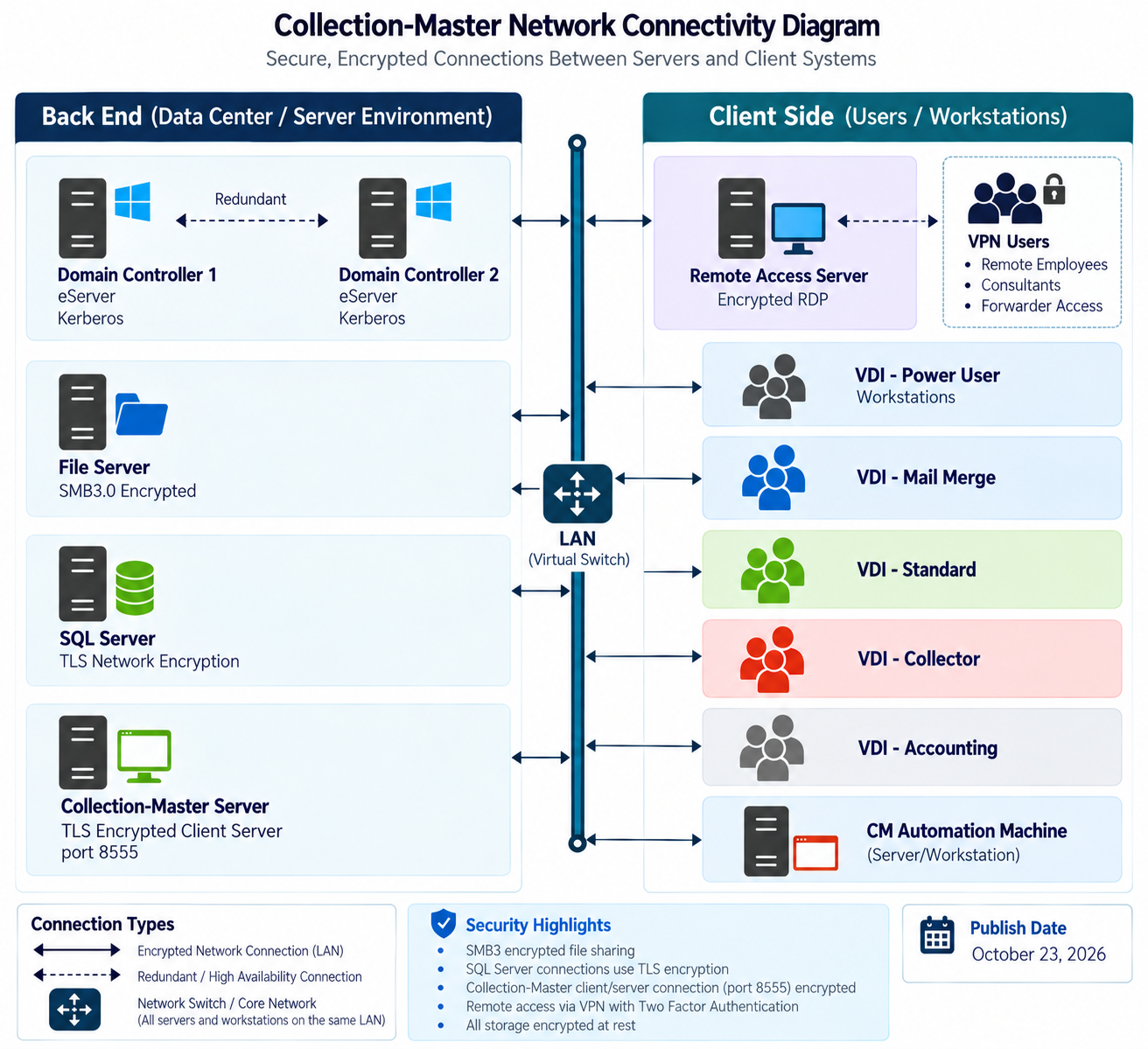
Requirements
| # | Title | Machine | Count | Notes | Specifications |
|---|---|---|---|---|---|
| 01 | DC | Domain Controller Server | 2 |
• The domain controller is in charge of serving network security and services. • It must be redundant so that maintenance reboots will not impact system. |
• CPU (2) • RAM (4GB) • C: Storage (200GB) |
| 02 | CM | Collection-Master Server | 1 |
• The Collection Master server provides the client-server portion. • Multiple CPU cores provide faster performance for more users. • C: Drive is for the OS. • F: Drive is for the Primary Application "F:\CLSINC" • N: Drive is for the Users Folder "N:\USERS" |
• CPU (4-8) • RAM (32-64GB) • C: Storage (200GB) • F: Storage (2000GB) • N: Storage (1000GB) • Storage is based on an estimate of 2GB for Collection-Master and 1 MB per 25 claims • Media storage is additional, and can vary considerably from firm to firm • Firms will usually have additional storage requirements outside of Collection-Master |
| 03 | SQL | SQL Server | 1 |
The SQL Server will provide the required database for: • SQL-SYNC (Collection-Master) • vMedia Metadata |
• CPU (2-4) • RAM (32GB-64GB) • C: Storage (200GB) • D: Storage (1000GB) • Storage is based on an estimate of SQL-SYNC requiring 1 MB per 25 claims • vMedia will typically use less than 10GB for the Images Metadata • Additional storage will be required for SQL requirements (Backup, Transaction Logs, etc) |
| 04 | CM-Automation |
CM Automation Machine (Server/Workstation) |
1 |
CM requires several applications to provide Automation Services. • SQL-SYNC (2-6 Session) • Q-Monitor (1 Session) • vMedia - Export2CM |
• CPU (2-4) • RAM (8GB) • C: Storage (300GB) |
| 05 | Remote | Remote Access Server | 1 |
Guests may be invited into the system. Will need VPN security for access. • Remote Forwarder Access • Consultants |
• CPU (4-8) • RAM (32-64GB) • C: Storage (300GB) • D: Storage (1000GB): Stores profile information, My documents, and other information • Collection-Master will not actually use any space on the D: Drive |
| 06 | VDI-Power | VDI - Power User Workstation | 4 |
Workstation for Power Users. • A Power user will leverage automation and batch processing. • They may export large amounts of data and use them to perform analytics. • D: Drive would be used for power merge. |
• CPU (2/4) • RAM (8GB) • C: Storage (200GB) • D: Storage (500GB) |
| 07 | VDI-WP | VDI - Mail Merge | 2 |
This machine is used to perform Mail Merge. • Any user that will create and actually merge large batches of word processing will require this type of machine. • Merge-Pool is a feature that allows a user to request documents but have another user actually perform the merge. Requesting documents to be added to the Merge-Pool does not require a VDI-WP Machine. • Additional Storage is for "Power Merge." • WordPerfect will leverage memory. |
• CPU (2/4) • RAM (16GB) • C: Storage (300GB) |
| 08 | VDI-Collector | VDI - Collector | 8 |
Workstation for a typical collector. • This minimum configuration should meet all requirements for a typical collector. • Note: Power Merge or large batches of word processing mail merge would not work for these users. Requesting Documents to Merge-Pool would work very well. |
• CPU (2) • RAM (4GB) • C: Storage (150GB) |
| 09 | VDI-Standard | VDI - Standard | 5 |
Workstation for a "Standard User." • Paralegals / Attorneys, etc. • Note: Power Merge or large batches of word processing mail merge would not work for these users. • Small Batches (100 documents or less) of documents should merge properly. • Requesting Documents to Merge-Pool would work very well. |
• CPU (2) • RAM (6GB) • C: Storage (150GB) |
| 10 | VDI-ACC | VDI - Accounting | 1 |
Workstation for an "Accounting User". • This machine is similar to a standard but may be configured differently to meet special accounting needs. • Accounting often has different configuration settings, which is the primary reason for a different category from VDI-Standard. |
• CPU (2) • RAM (6GB) • C: Storage (200GB) |
| 11 | Printer-Acc | Accounting Printer | 1 |
• Preferably with a WYCOM device for security and multi-bank account capabilities. • Note: Thinprint or other compression technology is important for printing |
• Wycom • PCL5 |
| 12 | Printer-WP | Word Processing Printer | 1 |
• High Duty Cycle Printer for printing huge volumes of WP output. • Note: Thinprint or other compression technology is important for printing |
|
| 13 | Printer-RPT | Reports Printer | 1 |
• High Duty Cycle Printer for printing reports. • Note: Thinprint or other compression technology is important for printing |
• Letter Tray • Legal Tray |
| 14 | Backup | Backup |
• Veeam Backup - Local & Offsite Backups • Your firm should determine the need. |
• All servers will need to be backed up. • All profiles will need to be backed up. • Restores need to be a service. |
|
| 15 | Antivirus | Antivirus |
• Every Machine will need Antivirus. • Your firm should determine the need. |
||
| 16 | Dr-Site | Dr-Site |
• Disaster Recovery (DR) site; VR DR may be attractive. • If not, a DR Plan to restore at another location is required. • Your firm should determine the need. |
Required Software Applications
| # | Application | Description |
|---|---|---|
| 01 | Microsoft Office | MS-Word | MS-Excel | MS-Access |
| 02 | MS-365 | MS-365 or Exchange Server to host email & other Office services |
| 03 | WordPerfect | WordPerfect used for Mail Merge (Forms Generator) |
| 04 | Notepad++ | Text Editor |
| 05 | FileZilla | FTP Software |
Required Services
(Example: Monitoring)
| # | Service | Description |
|---|---|---|
| 01 | SQL Server |
DBA Services • Maintain Databases – Indexes – Space • Manage Backups / Restores • Manage Security |
| 02 | MS-365 |
Exchange Server Services • Manage Security |
| 03 | Active Directory |
Network Security Services • Manage Security |
| 04 | Backup | Backup / Restore |
| 05 | Set Up Users |
• Set up User Profiles, etc. • Maintain Security |
| 06 | Passwords | Maintain Passwords, including resets. |
| 07 | Patches | Both Server and Workstations will need patching. |
Data Storage Media Strategy
In a perfect world, all storage would be the fastest flash memory storage in solid-state drives, but magnetic hard drives or cloud storage may be used for archiving data. Regardless of the storage chosen, it is important to remember that encryption at rest is an important part of the solution.
|
Storage Type |
Description | Pro | Con | Recommended Usage |
|---|---|---|---|---|
| Solid State Drives | Flash memory offers fast, durable storage, but at an increased cost. Flash-based USB drives are more expensive per gigabyte of storage than magnetic or optical media, and flash-based solid-state drives are a very cost-ineffective method of storing files. | • Fastest storage option | • Increased Cost |
• SQL Database • Primary Application • Temporary Work files |
| Magnetic Hard Drives | The cheapest form of data storage is magnetic hard drives. This option is relatively inexpensive for backing up large volumes of data. However, this method is prone to physical failure or damage, so backups need to be refreshed periodically. | • Least expensive storage | • Slower Storage Option |
• Archive Data • Old Media • Backups |
| Cloud Storage | Cloud storage uses the Internet to transfer and store files on remote servers. This has the advantage of additional security against damage since a disaster that destroys a user's home PC is unlikely to affect servers many miles away. There are various tiers of cloud storage. The cost of this service can range significantly in price depending on the service tier selected. |
• Pay only for what you use • Low upfront cost • Managed Service • Off-Site • Disaster Recovery |
• Decreased performance |
• Archive Data • Important Documents |