How to Optimize Client Server
Collection-Master Client-Server is one of the most significant advances in performance, data integrity, and reliability of the product. Client-Server will leverage almost any hardware and make it “better than distributed mode”, but there are ways to improve performance.
CPU / Threads
- More Cores / Threads = Better Performance.
- VMWare license usually allows 8 cores before licensing costs increase.
- VT Recommendation:
- – 8 CPU / threads on the server. (More is better, but may be cost-prohibitive.)
- High CPU Tasks: (Plan on additional cores when running these tasks.)
- SQL-SYNC sessions typically utilize core and may require additional CPU resources.
- Automation / EDI tasks have a high CPU requirement and may require additional CPU resources.
Memory
- Even though it looks like the server isn’t using memory, every last bit of available memory is dedicated to caching data.
- VT Recommendation:
- – 32 GB of Memory is the least that should be allocated.
- If the F:\CLSINC\DATA folder is larger than 32 GB, then 64 GB is appropriate.
- If the data folder is larger than 64GB, then 128 GB is appropriate.
Resource Monitor
Microsoft provides this tool to monitor available resources. Notice in the example below the results show that 9GB are in use and that 24GB are available. Based on that information, you might feel that 16GB would be an appropriate amount of memory for this server.
Looking more closely, you may notice that most of the “Available Memory” is allocated to Standby (Blue) with a sliver as free (Light Blue). If you see a significant amount of free memory, then the server has too much memory allocated. Standby memory acts as a cache, reducing the burden on the hard disk. You might notice, as an example, that pressing 1-1 to launch the Paperless File is sometimes faster than at other times. When it’s fast, the Standby memory is serving the request.

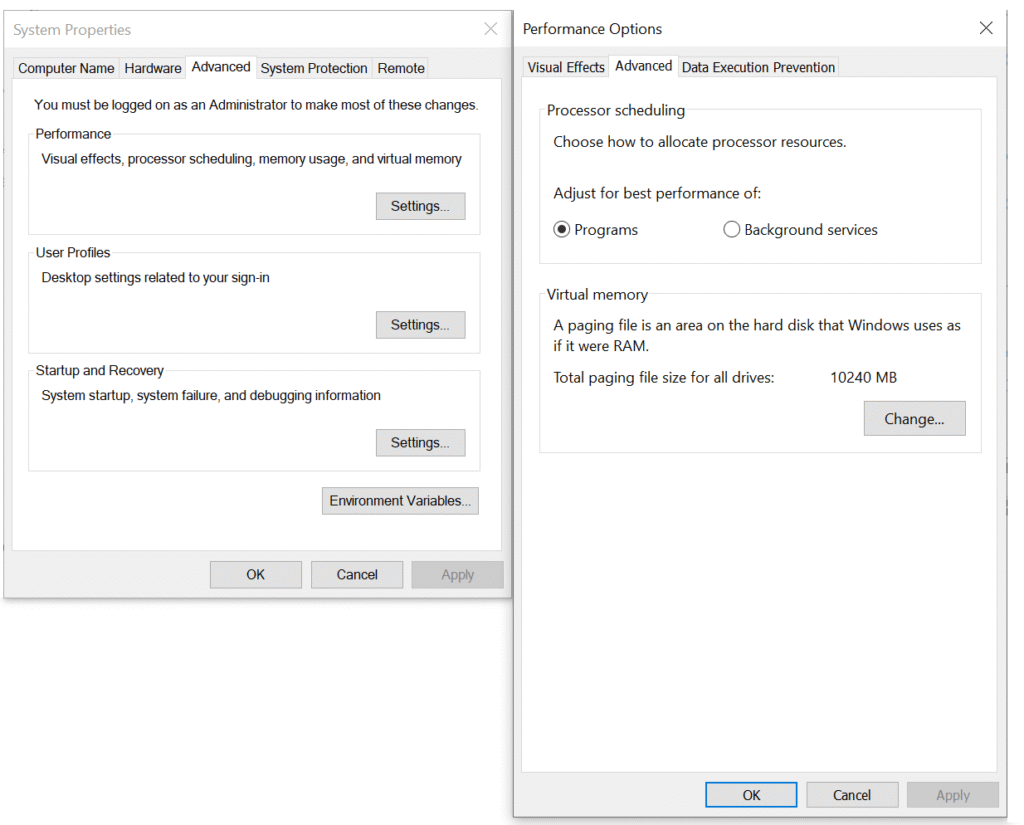
Advanced System Settings
Client Server runs as a background service.
- Make sure performance is set to “Background Services.”
- When prioritizing Programs, the foreground application is prioritized. A Client Workstation should be prioritized for Programs.
- Below are the typical settings delivered with Windows.
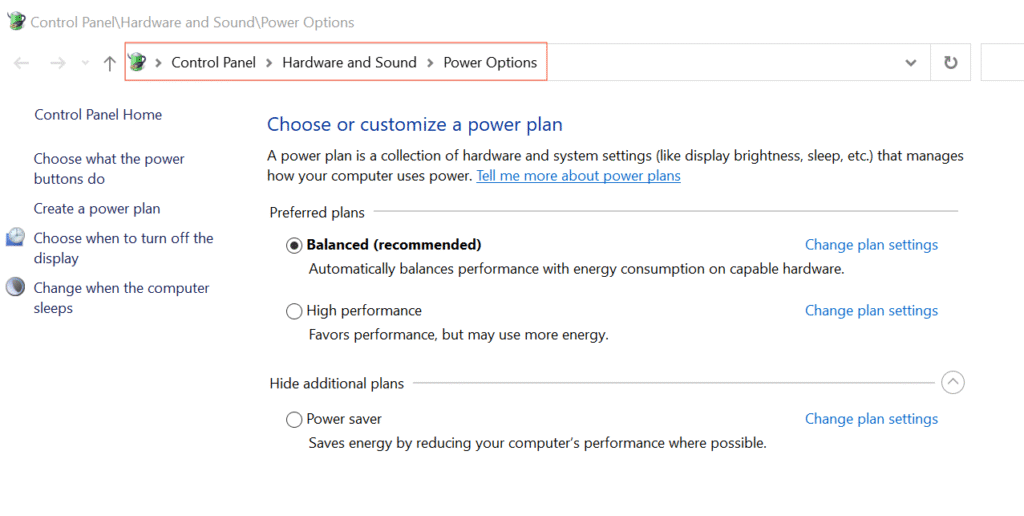
Choose a Power Plan
- Make sure that your Power Plan is set to “High Performance.”
- Very often, “Balanced (recommended)” is the default setting in Windows.
- Balance is great for limiting energy consumption, but not great for Performance.
- Below are the typical Power Options delivered with Windows.
Data Storage Media Strategy
In a perfect world, all storage would be the fastest flash memory storage in solid-state drives, but magnetic hard drives or cloud storage may be used for archiving data. Regardless of the storage chosen, it is important to remember that encryption at rest is an essential part of the solution.
VT Recommendation:
- Drives should be self-encrypting. Many times the storage subsystem will provide encryption.
- Use 15K RPM drives for “static information,” particularly for very large data like media.
- Moving F:\CLSINC\DATA, F:\CLSINC\HISTORY, F:\CLSINC\SHARE, and F:\CLSINC\PERM to a solid-state drive (SSD) will have a significant performance gain.
- All the folders in Secure Data will significantly benefit from an SSD drive.
| Storage Type | Description | Pro(s) | Con(s) | Recommended Usage |
|---|---|---|---|---|
| Solid State Drives | Flash memory offers fast, durable, storage, but at an increased cost. Flash-based USB drives are more expensive per gigabyte of storage than magnetic or optical media, and flash-based, solid-state drives are a very cost-ineffective method of storing files. | • Fastest Storage Option | Increased Cost |
• SQL Database • Primary Application • Temporary Work Files |
| Magnetic Hard Drives | The cheapest form of data storage is magnetic hard drives. This option is relatively inexpensive for backing up large volumes of data. However, this method is prone to physical failure or damage, so backups need to be refreshed periodically. | • Least Expensive Storage | Slower Storage Option |
• Archive Data • Old Media • Backups |
| Cloud Storage | Cloud storage uses the Internet to transfer and store files on remote servers. This has the advantage of additional security against damage since a disaster that destroys a user's home PC is unlikely to affect servers many miles away. There are various tiers of cloud storage. The cost of this service can range significantly in price depending on the service tier selected. |
• Pay only for what you use • Low Upfront Cost • Managed Service • Off-Site • Disaster Recovery |
Decreased Performance |
• Archive Data • Important Documents |
Compression, Deduplication & Encryption
Modern storage devices have advanced capabilities that can have a big impact on performance.
In today’s digital world, data is everywhere. But managing it effectively can be challenging. Three technologies that help with storage are compression, deduplication, and encryption. Each plays a different role, and it’s important to understand what they do and how they impact performance.
Performance Considerations
The performance implications of using these technologies can be significant, especially when applied together. Each layer adds its own processing overhead, which can impact response times and resource utilization. However, the decision to implement them — and to what extent — ultimately depends on your priorities. Whether the goal is to maximize security, reduce storage costs, or maintain high-speed access, your organization must evaluate the trade-offs and tailor your approach accordingly.
Compression: Making Data Smaller
Compression reduces the size of data by using algorithms to remove redundancy. Think of it like squeezing air out of a bag of chips — the content stays the same, but it takes up less space.
Impact on Databases: Moderate
For databases, compression can save disk space and reduce storage costs. However, it can slow things down slightly because the system needs to decompress each record before reading it. The speed trade-off depends on the compression method and hardware.
Deduplication: Removing Duplicate Data
Deduplication finds and removes duplicate data. Imagine storing ten copies of the same photo. With deduplication, only one copy is kept, and the others are replaced with pointers.
Impact on Databases: High
If many records contain repeated content, deduplication can significantly reduce storage needs. But in a database where there is a high volume of INSERT, UPDATE, and DELETE, deduplication may introduce a significant lookup overhead. The system has to reassemble the full record using the stored data and its references.
Encryption: Protecting Data
Encryption scrambles data so that only someone with the correct key can read it. It’s like locking your data in a safe. Many storage solutions provide encryption at rest. Encryption at rest is done at the drive level and has a very low impact on performance.
Impact on Databases: High
Encryption adds a security layer, which is critical for sensitive information. However, it requires decrypting each record before use. In systems where records are read one at a time, this step can add noticeable delay, depending on the encryption algorithm and key management setup.
Overall Impact of Compression, Deduplication & Encryption
| Technology | INSERT Impact | UPDATE Impact | DELETE Impact | Benefit |
|---|---|---|---|---|
| Compression |
MODERATE: Data must be compressed before writing. |
MODERATE: May require recompression of full record. |
LOW: Generally minimal effect unless block recompression is needed. |
Saves disk space and may improve I/O throughput. at the cost of CPU. |
| Deduplication |
HIGH: New data must be checked against existing data for duplicates. |
HIGH: May need to re-analyze and update pointers. |
MODERATE: Might need to update reference counts and manage shared blocks. |
Reduces redundant storage and improves efficiency. The space savings and CPU impact are greater than compression. |
| Encryption |
MODERATE: Data must be encrypted before writing. |
MODERATE: Updated data must be re-encrypted. |
LOW: Deletion is typically unaffected beyond metadata cleanup. |
Secures sensitive information from unauthorized access. Combining Encryption with compression or deduplication is challenging and has an even higher impact. |
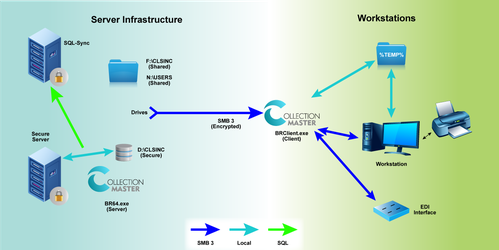
Collection-Master Network Diagram