Vertican Professional Services (vPros)
Emergency Services
Emergency Services can be ordered from the Professional Services menu in the vStore.
- Includes a maximum of 2 hours to solve an emergency issue.
- Emergency Services may require additional hours to resolve the issue.
- If the emergency is resolved in less than 2 hours, the balance cannot be used for any other issue.
- Purchase of Emergency Services before any work is performed.
- If Emergency Services are required during Weekend/Holiday hours:
- Requires phone contact:
- Collection Master & vMedia: 800-435-7257 x731
- Q-Law & Q-LawE: 800-435-7257 x499
- Requires confirmation from Vertican that your request is designated a Severity Level 1 issue.
- Requires phone contact:
Web Based Consulting
Hourly Web Based Consulting is primarily used for the following:
- Direct Support when you need assistance beyond what Ask Goldie provides (Collection-Master, Q-LawE/Q-Law, and vMedia).
- vPro Service Packages, which are set packages with defined hours that need to be purchased.
- Other consulting services.
Cost of Professional Services provides information on the expiration for Consulting hours and using banked hours.
Web Based Training
Professional Services training is reserved for pre-planned sessions. It is not for use in lieu of Consulting hours for direct technical support (Collection-Master, Q-LawE/Q-Law, and vMedia).
Scheduled hours are based on availability and cover basic product setup, functionality, and tools, as well as training for DTPs and optional modules. For both basic and advanced training, Vertican offers special vPro Service Packages at a set price or you can purchase an hour of Consulting for Vertican to develop a customized training plan and estimate. Any remaining unused time can be used within 180 days or you can request a credit on your next invoice.
Instances where Training is billed as Consulting.
- If the training is customized for the firm or lacks a defined scope.
- If training covers SQL-Sync, it is only available with Consulting hours.
- If the firm desires a consulting session on firm processes or systems.
During a training session, if your questions or needs fall outside the scope of training, your Vertican representative may suggest converting your session to Consulting in order to fulfill your needs.
Onsite training is based on availability; please contact Account Management if interested.
Business Consult & Custom Work
Vertican offers the most expertise to provide business consultation and perform custom work, including software development, hardware consultations, new server setup, workstation installations, network setup or server migrations, SQL-Sync training and consulting, data recovery, application maintenance assistance, business development, workflow automation consultations, customized reports/queries/templates, project planning, and research/resources used to resolve data and/or application errors that may result from user errors or misuse of the application.
Service is provided according to resource availability on the basis of a Statement of Work (SOW). However, Vertican now offers a number of vPro Service Packages for custom work that previously required a SOW. These include automation, custom templates, performance optimization and many other services.
Data Migration
Data migration is a special Professional Service we provide on a client-by-client basis per a Statement of Work (SOW). It involves moving the clients’ data from one application/software to another. It occurs whenever legacy systems are being replaced or augmented by new applications/processes.
Mock/Test Migration
- Mock migrations are performed prior to the final data conversion; clients must examine data conversion for accuracy.
- Vertican provides guidelines for laying out the means and steps necessary to review data for integrity.
- The client must review mock migration data within 30 calendar days of delivery. Any mapping errors must be communicated to Vertican within this timeframe. Failure to do so will cause a delay in the estimated Go-Live timeline and potential problems once the product is Live.
- Data mapping issues identified during this phase will be covered under the normal migration SOW at no additional cost to clients.
- Any data issues discovered after the mock migration data review phase could:
- Disrupt the system go-live timeline.
- Require a new SOW to cover necessary changes.
Final Migration Data Review
- After Vertican has completed the data migration, the client must review data integrity prior to accepting the Final migration.
- Once the system goes into production, any data repair/mapping modification will be charged at our rushed programming rate under a separate SOW.
Professional Services are purchased separately on the vStore at an hourly rate, as a vPro Service Package, or according to a Statement of Work (SOW), depending on the type nature of the service.
180-Day Expiration
Professional Services purchased on an hourly basis expire 180 days after purchase. This means unused Professional Service hours (training or consulting) can be banked and used later for up to 180 days or you can request a credit on your next invoice.
- This policy applies to all hourly Professional Services, whether hourly Web-based Training, hourly Web-based Consulting, or any hourly services that Vertican may provide in the future.
- The 180-day expiration policy does not apply to Professional Services covered by a Statement of Work (SOW). Each SOW includes its own terms and does not have an automatic expiration date.
- Expired hours are nonrefundable.
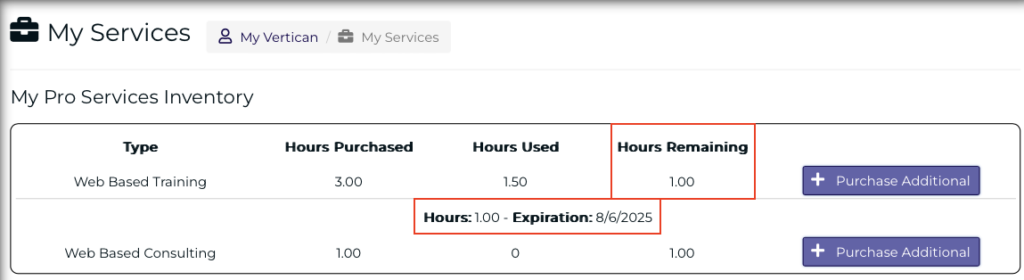
View Banked Hours
You can see remaining unused hours and the expiration date.
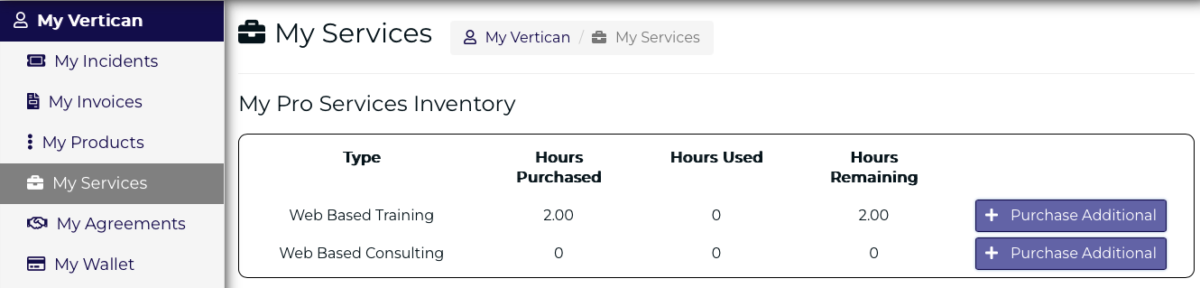
- Go to vPortal > My Vertican > My Services.
- My Pro Services Inventory lists any Hours Remaining.
- Click on a number of Hours Remaining to see the expiration date.
- The expiration date is the deadline for services to be completed.
- Please submit your order well in advance of the expiration date.

Convert Hours
To convert existing training hours to consulting hours or vice versa:
- 1 Training Hour = 30 Minutes Consulting
- 2 Training Hours = 1 Hour Consulting
- 1 Consulting Hour = 2 Training Hours
- When ordering, please make a request to convert hours.
Use Banked Hours
- If your Hours Remaining partially cover a service package:
- Purchase additional hours on the vStore.
- Choose the correct vPro package type: Training or Consulting.
- In the optional detail field, enter the number and name of the service package.
- If your Hours Remaining fully cover a service package:
- Submit a query to Ask Goldie with the vPro Service Package number and state that your available hours cover the service.
- When Ask Goldie replies, give the response a “thumbs down”, and click “I need more help”.
- Your query will be forwarded to Client Success, who will confirm your available hours and reach out to you.
Service Credits
If you report a potential bug that is validated as a bug, any applicable Professional Service payments will be credited.
All Vertican training materials, documentation, and Ask Goldie query results are the confidential intellectual property of Vertican.
Clients may record, capture, copy, and use training materials from Vertican provided that such use is solely for its internal training purposes. Client may add its own business rules to the training materials but may not change or modify in any other way Vertican’s training materials except as authorized in writing by Vertican. Vertican shall not be responsible for any additions or unauthorized alterations to such materials.
SOW Definition
- A SOW is a written, dated contract describing any custom work requested by clients.
- It is an estimate of work based on the mutual understanding as established in writing at the time of SOW execution.
When to Create a SOW Request
- Before creating a SOW request, please check the list of vPro Service Packages as some packages cover custom work that previously required a SOW.
- If your needs are not addressed in a vPro Service package and you don’t know how much time will be required, you’ll want to create a SOW request.
- You’ll create a SOW request in vPortal if you have authorization to do so and receive a quote from Vertican.
- Complete the New SOW Request, then click the [Submit Request] button.
- When you submit a SOW request, Client Success will advise you whether service will be offered under a SOW or whether service can be rendered as Professional Services hours and if so, how many hours to purchase.
- Professional Services are pre-paid tickets, which are closed after Professional Services are complete.
- Even if you have banked Professional Services hours, you may still be advised to create a SOW to determine how many hours your request will require.
Types of SOW Pay Arrangements
- An open-ended SOW: an estimated block of time is quoted, but only final hours performed on the SOW are billed.
- A fixed-rate SOW: a fixed amount is quoted and paid, regardless of the outcome of the work effort.
Potential Research Fee
- Vertican occasionally requires an upfront research fee to create complex SOWs.
- While the research fee is prepaid before the SOW is created, if you accept the SOW, the fee is listed in the SOW and payment is credited toward the total SOW balance.
- Depending on the type of request, SOW preparation may require hours of investigation among multiple team members.
- There have been instances where clients did not move forward with a SOW that had required many hours to prepare.
- Vertican will inform you if a research fee is required before work on the SOW can begin.
- If you choose not to proceed with the research fee, the SOW request will be closed.
SOW Process
- Potential Research Fee: Vertican will inform you if a research fee is required before the SOW can be prepared.
- If a research fee is required, Vertican will begin SOW preparation after the fee is paid and verified in vPortal.
- Creation of SOW: Vertican may create a SOW after discussing with you or you may submit a SOW request.
- Complete the New SOW Request, then click the [Submit Request] button.
- Submission to Client: After Vertican prepares the SOW, you will be notified via email.
- You have 14 business days from email notification to accept and pay for the SOW in vPortal, after which it becomes invalid.
- SOW proposals from Vertican are under copyright and should not be shared with third parties.
- Client Acceptance & Payment: A SOW must be accepted and prepaid in vPortal within 14 business days from notification.
- Verbal approval cannot be accepted.
- You will be notified of the SOW via email, with a link to vPortal.
- To accept the SOW in vPortal, check the box next to “I agree.”
- Click the [Proceed to Checkout] button and pay for the SOW.
- Payment generates a paid invoice record in My Invoices.
- Client Success is notified when you accept the SOW and complete payment.
- Provision of SOW services can only begin after your acceptance and payment in vPortal are confirmed.
- Changes & Amendments: Changes can be requested by you or Vertican’s representative.
- Any change that exceeds 15% of the original SOW will require a written amendment.
- Amendments need to be accepted by you before work can resume.
- Completion & Inspection: Upon completion and delivery of the SOW work, you have 30 calendar days to inspect and perform any necessary test to accept/reject the delivery.
- Rejection & Acceptance: Any rejection of a SOW must be communicated in writing or via email and must include the reason(s) for the rejection.
- If no rejection is received by Vertican within the allotted 30 calendar days, you have accepted the SOW work by default and the SOW is closed.
- Defects & Bugs: If you believe you have discovered a defect or bug within 30 calendar days from delivery, Vertican will investigate.
- If the issue is determined to be a defect or bug that is the responsibility of Vertican, Vertican will fix the issue at no charge.
- However, sometimes a program does not work as expected because the client did not provide sufficient information to Vertican.
- In that case, one of the following may be necessary to resolve the issue: a new billable SOW, a support incident, or Professional Services hours.
Select Professional Services

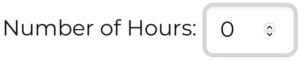
Choose Web Based Training or Web Based Consulting and select the number of hours you wish to purchase.
Client Success will be able to give a quote of estimated time for a specific service.
If purchasing a vPro Service Package, enter the name of the service package and its corresponding number in this field.

If you need to locate the name and number of the service package, refer to the vPro Service Package Directory.

Read and accept the Terms and Conditions by putting a √ next to I Agree.

Click the [Add to Cart] or [Proceed to Checkout] button.

To see what Professional Services you’ve ordered, click on My Vertican from the main Dashboard.
From the left navigation menu, click on My Services to see Hours Purchased, Hours Used, and Hours Remaining.
Hourly Professional Services expire 180 days after purchase.
To see the expiration date for your hourly services, click on the number under Hours Remaining.